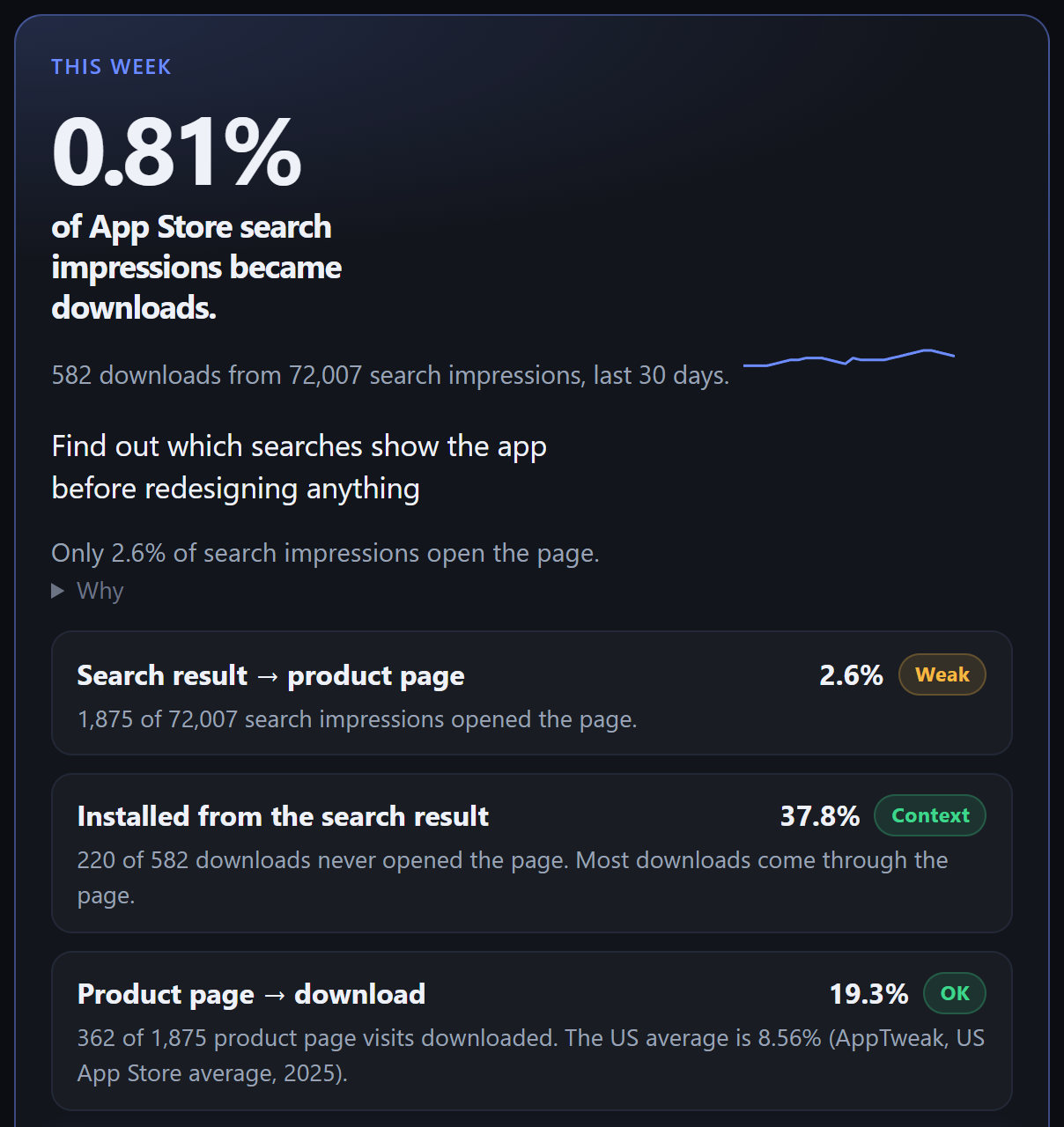
Customer Tasks Pro is an example app with example numbers, on the real RocketASO overview.
App Store and Google Play
RocketASO reads your App Store and Google Play reports, names the one fix worth the most this week in dollars, and measures whether it moved installs.
The product
Search conversion for the last 30 days, the step where searchers drop off, and what to do first. Connect a store and the same page shows your numbers.
Customer Tasks Pro is an example app with example numbers, on the real RocketASO overview.
Capabilities
Each one is a page in the workspace, named for the job you do there.
Audit metadata, screenshots, ratings, and locales, read the findings in priority order, and draft the copy for the next version.
See which searches show the app and whether each is about it, then track their ranks daily.
Read the review, write the reply in that thread, and publish it to the store once publishing is on.
See the first frames next to the apps in the same search, and add or replace one on the store.
See which storefronts read a listing that is not theirs, and reuse the other store's translations as a draft.
Watch a rival's title, icon, and rating next to your own, and what changed since the last look.
Size a product page test before you run it: how long a lift takes to show at your own traffic.
Connect read only for Apple's popularity number on every tracked search, and paid and organic downloads side by side.
Read this week's listing numbers. Store pulls repeat about every 6 hours. Run sync, audit, or a rank check when you want one sooner.
Read only by default
14 days free, no card.
Questions
An App Store Connect API key with the Sales role (Apple asks for an Admin key once, to start its analytics reports), and a Google Play service account with View app information and bulk reports. Both read your listing, ratings, reviews and reports. Neither can change anything while publishing is off.
No. Publishing is off until you turn it on for a store. After that, each change, reply and upload waits for you to confirm it, unless you turn on an automatic rule yourself.
Yes. Paste any App Store or Google Play link and the public listing is audited in seconds. Search conversion, trials and the dollar value of each fix need the store connection.
From Apple: connect Search Ads read only, which costs nothing without a campaign, and each tracked search gets Apple's popularity number from 1 to 100. Without it, demand comes from the store's own autocomplete. Apple and Google publish no search counts, so none are shown.
Each listing change is logged with its date. Seven and fourteen days later, the share of search impressions that became downloads is compared with the same number of days before it, and browse traffic is checked so a store-wide swing is not credited to the change.
Yes: the listing, reviews, ratings and search ranks. Listing visitors and installs by source come from the export Play Console writes every day; point RocketASO at it once.
Delete the account in Settings. The workspaces only you belong to, with their apps, reports, keyword history and store keys, are removed from the live database at once.